

By: Yohan Indrawijaya, an Instrumentician at Old Sugar Factory at East Java, Indonesia
MY STORY WITH OMRON PLC
Im not expert in Omron’s PLC but I love PLC Omron. This PLC has give me so much more knowledge and lesson. This is beginning from so many Omron’s PLC in my factory but very few people that care and knowing the ladder program of them
My first OMRON’s PLC that learned is CQM1H CPU21. The lates 90’s PLC. I remember that time the program is using CX Programmer version 3.3 but now 9.6 .Time after time, many problem solved, so many new knowing i got and now i will share you about how to install the SCU41 module join with the CPU. This is start From Zero until you know!
WHY YOU USE THE OMRON PLC’S?
Why we use the OMRON PLC for our system monitoring? The answer is: They are so cheap enough and good enough to working. In PLC matter, the Analog Input module was so expensive enough. But not for OMRON.
If one module of PLC brand XX with 8 analog input saying 600USD, the OMRON said 300USD. This is our consideration to decide what PLC we use. We take over 640 analog parameters in the factory. You can imagine how expensive the money to invest. If one analog module with eight input channel need 600 USD, it’s equal with 640 / 8 * 600 USD =48,000 USD or IDR 720 M to invested for the expensive one. But not for OMRON PLC.
I’m sorry that I don’t mean to look down another brands. We are old factory and our parameter are not a very sensitive parameter to control and to supervising.
WHAT IS THE SCU MODULE? HOW CAN YOU DECIDE TO USE THE MODULE?
Our Integrated information system are using OMRON PLC for knowing each other parameter inside each section of factory.

In our old sugar process factory, the section are:
- MILLING
- PURIFYING
- EVAPORATOR
- VACUUM PAN
- CENTRIFUGAL
- PACKAGING
- POWER ELECTRICITY
- BOILER
During the Sugarcane Mill Season, we also need to knowing and monitorize how much electricity is used to make Crystal Sugar from sugarcane. From the first process until the last.
We have several POWER METERS with MODBUS-RTU feature to communication with the master such as Computer and other system control but nobody know how to explore this feature.
After looking for the solution, a friend from another sugar factory tell us to use the SCU module for communicate and monitoring the address inside of several Power Meters .
After we purchased the modul, we try to connect with the Power Meter. But: None the data can view or monitorize! Why this happen? because we dont have the knowledge to do it. After some try and learn, we were finally solve the the problem.
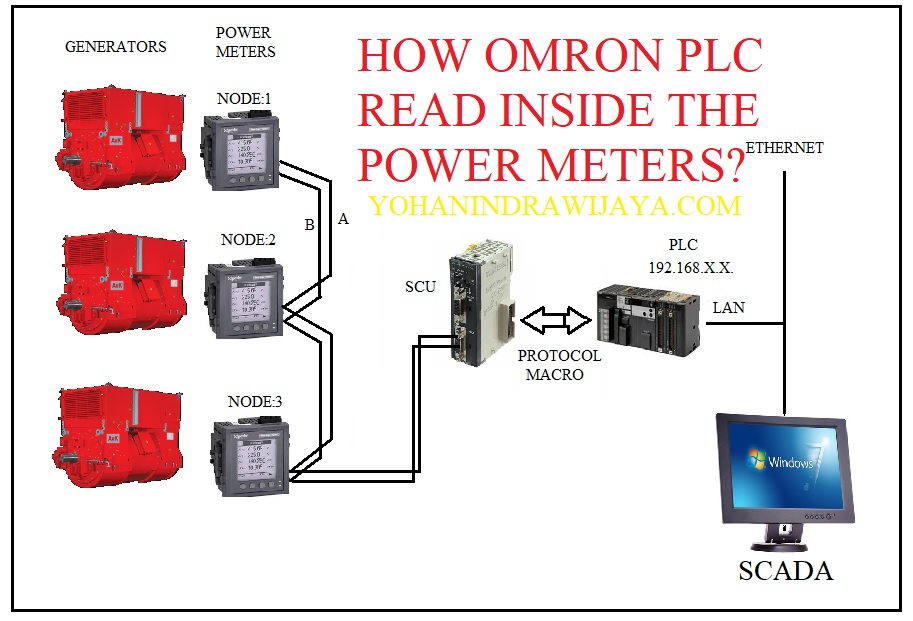
We must have a ladder or function block to download to the PLC. Then we must have a good known about CX Protocol to download the PMCR programs. The omron’s official web has it info, and im also will inform you that we have the information to solve this problem was come from the PLC Forum!
LET’S GO TO THE LESSON. INSTALL THE HARDWARE
The First time is turn off the PLC. Install the SCU41 Module to PLC. Turn it on.


The CPU said there is an error at the PLC. error said: ER HE. After check the manual book, it mean that there is a problem inside the Input/Output . We must re-check inside the setting in the I/O table of the program.
You must do online with PLC via USB cable. You must be set the setting until the lamp turn on Green light. NOTE: Make sure that tour USB port was recognized by your computer. Check it up to Device Manager. And if your USB driver was okay, do next with online to your PLC.
Now open your OMRON CXProgrammer software. In this article, I use V9.6.


Now we are go to IO Table and Unit Setup. Open it. Please do register your module by set Add Unit. Choose Communications Adapter then Set the module at “F” position at the selector switch and choose. Then fill the number with “15” at the unit number settings.


Now download the settings to the PLC. Point your mouse to the icon Transfer to PLC and then click OK. After download succes, you need to return to Run Mode or Monitor Mode.


Now take a look at the PLC. The Red light are gone and change to Green light. Your setting was successfully. This should be green colour at the RDY and ERR Off. The code ERR HE at CPU must be gone and change with ID code.


SET THE SPECIAL UNIT SETUP
Now back to the IO table. Look at to the Main Rack. Double click it. You will be shown the Parameters of your newly installed SCU module.


Now do these custom settings to your module:
- Displayed Parameters: Port1: Protocol macro Settings
- Port1 Settings: User settings
- Data Lenght: 8 bit
- Stop bit: 1 bit
- Parity: None
- Baud Rate: Default ( 9800 bps)
- Protocol Macro Transmission: Half Duplex
- Maximum number : 1000 byte
Sent these settings to the PLC by click Transfer to PLC ( PC to Unit ).


If you are work with your PLC in running mode, this is not possible. You must change your work PLC’s setting to Program Mode.


After your PLC started, choose to Monitor Mode. Your PLC has properly set.


Good Job. Now we are going to the next Lesson: CONNECT WITH MODBUS-RTU module.
